Alidade
Mix toward a reference.
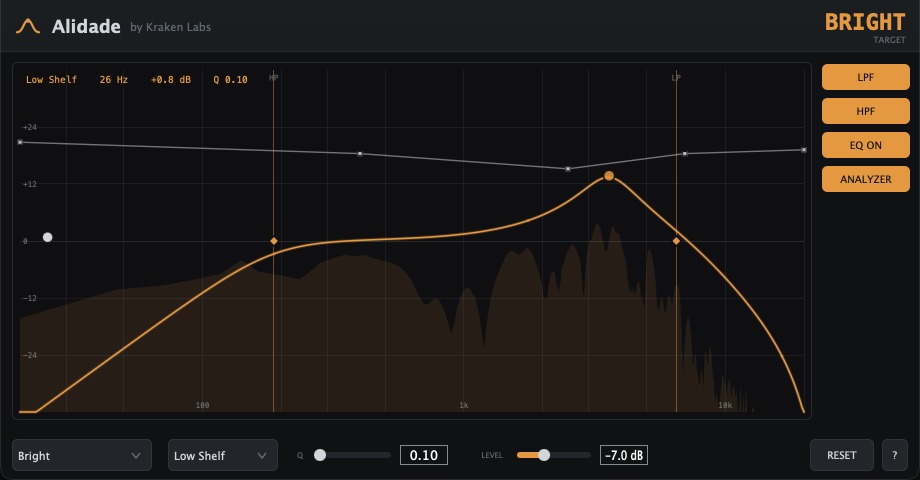
Alidade is a free reference-target EQ. It is a full parametric EQ with a live spectrum analyzer, plus an editable reference guide curve you shape your mix toward. Pick a target tonal balance and EQ until your spectrum traces the guide. It is the tonal sibling of Octant's loudness targets: Octant helps you hit a loudness target, Alidade helps you hit a tonal one. Free, everything unlocked.
Reference targets
Pick a target curve. EQ until your spectrum matches.
Most free EQs give you bands and an analyzer and leave the rest to your ears. Alidade draws a proven target balance right on the graph, so you can see how far your spectrum is from where you want it and close the gap deliberately. Start from a preset and reshape it point by point into a Custom curve. A LEVEL control shifts the whole guide up or down to match your mix.
- Flat
- Pink
- Modern
- Warm
- Smiley
- Vocal
- Broadcast
- Bright
- Dark
- Lo-Fi
- Mid Scoop
- Custom
Features
- Editable reference guideA multi-point target curve drawn on the graph. Pick a preset (Flat, Pink, Modern, Warm, Smiley, Vocal, Broadcast, Bright, Dark, Lo-Fi, Mid Scoop) or double-click the line to add points and trace your own Custom shape. LEVEL shifts the whole guide to your mix.
- Full parametric EQAdd as many points as you want, each a bell, low shelf, or high shelf. Drag for frequency and gain, set the width with the Q control, double-click to remove.
- High-pass & low-passDedicated HP and LP filters with on/off toggles and draggable cutoff markers, independent of the bell and shelf bands. An EQ ON toggle bypasses the parametric bands for a quick A/B.
- Live spectrum analyzerA real-time spectrum behind the curve so you can watch your mix against the guide, with the EQ response drawn over the top.
- Reads at a glanceThe guide, the spectrum, and your EQ curve share one graph, so the whole picture, where you are and where you want to be, is in front of you at once.
- Free, and part of the familyAlidade is free and pairs with the Octant loudness meter. Kraken Labs helps you hit targets, tonal and loud.
Pricing
Free. Everything unlocked.
Alidade is free. There is no purchase, no subscription, no license key, and no account to create. Download it, drop it on a track or your master bus, and every band, filter, preset, and the guide are unlocked from the first launch.
Install
Install
- Open the downloaded
.dmgand double-click the installer. - Follow the prompts to complete the installation.
- It installs the VST3 and AU into your system plugin folders.
- Open your DAW and rescan plugins if needed. Load Alidade EQ on a track or bus.
Requirements
- OS macOS 11 (Big Sur) or later
- Chips Apple Silicon & Intel (universal)
- Formats VST3, Audio Unit (AU)
- Hosts Any VST3 or AU host (Ableton, Bitwig, FL Studio, Reason, Logic, Cubase, Studio One, Reaper, and more)
A Windows build is not available yet. Want it first? Email me and I'll let you know the moment it ships.
FAQ
What is Alidade?
Alidade is a free reference-target EQ for macOS. It is a full parametric EQ with a live spectrum analyzer, plus an editable reference guide curve you shape your mix toward. Pick a target tonal balance, then EQ until your spectrum traces the guide.
How much does Alidade cost?
Alidade is free. There is no purchase, no subscription, no license key, and no account. It is part of the Kraken Labs free line, alongside the Octant loudness meter.
What is the reference guide curve?
The guide is a target tonal shape drawn on the graph. It is the tonal sibling of Octant's loudness targets: Octant helps you hit a loudness target, Alidade helps you hit a tonal one. Start from a preset (Flat, Pink, Modern, Warm, Smiley, Vocal, Broadcast, Bright, Dark, Lo-Fi, or Mid Scoop) and reshape it point by point into a Custom curve. A LEVEL control shifts the whole guide to match your mix.
How is it different from a normal EQ?
A normal EQ gives you bands and an analyzer and leaves the rest to your ears. Alidade draws a proven target balance right on the graph, so you can see how far your spectrum is from where you want it and close the gap deliberately instead of by guesswork.
Can I add my own bands and guide points?
Yes. Double-click empty space to add an EQ point (bell, low shelf, or high shelf), drag it for frequency and gain, and use the Q control for width. Double-click the guide line to add a guide point, and drag guide points to trace any target shape you like.
Does it have a high-pass and low-pass?
Yes, dedicated high-pass and low-pass filters with on/off toggles and draggable cutoff markers, independent of the bell and shelf bands. There is also an EQ ON toggle to bypass the parametric bands for a quick A/B while the filters stay active.
Which DAWs does Alidade work in?
Any VST3 or AU host: Ableton Live, Bitwig Studio, FL Studio, Reason, Logic Pro, Cubase, Studio One, Reaper, and more.
Windows or macOS?
macOS first: a single universal build for Apple Silicon and Intel, in VST3 and AU. A Windows build is not available yet. Email thomas@krakenlabs.io if you want it and I will let you know when it ships.