Octant
The delivery meter.
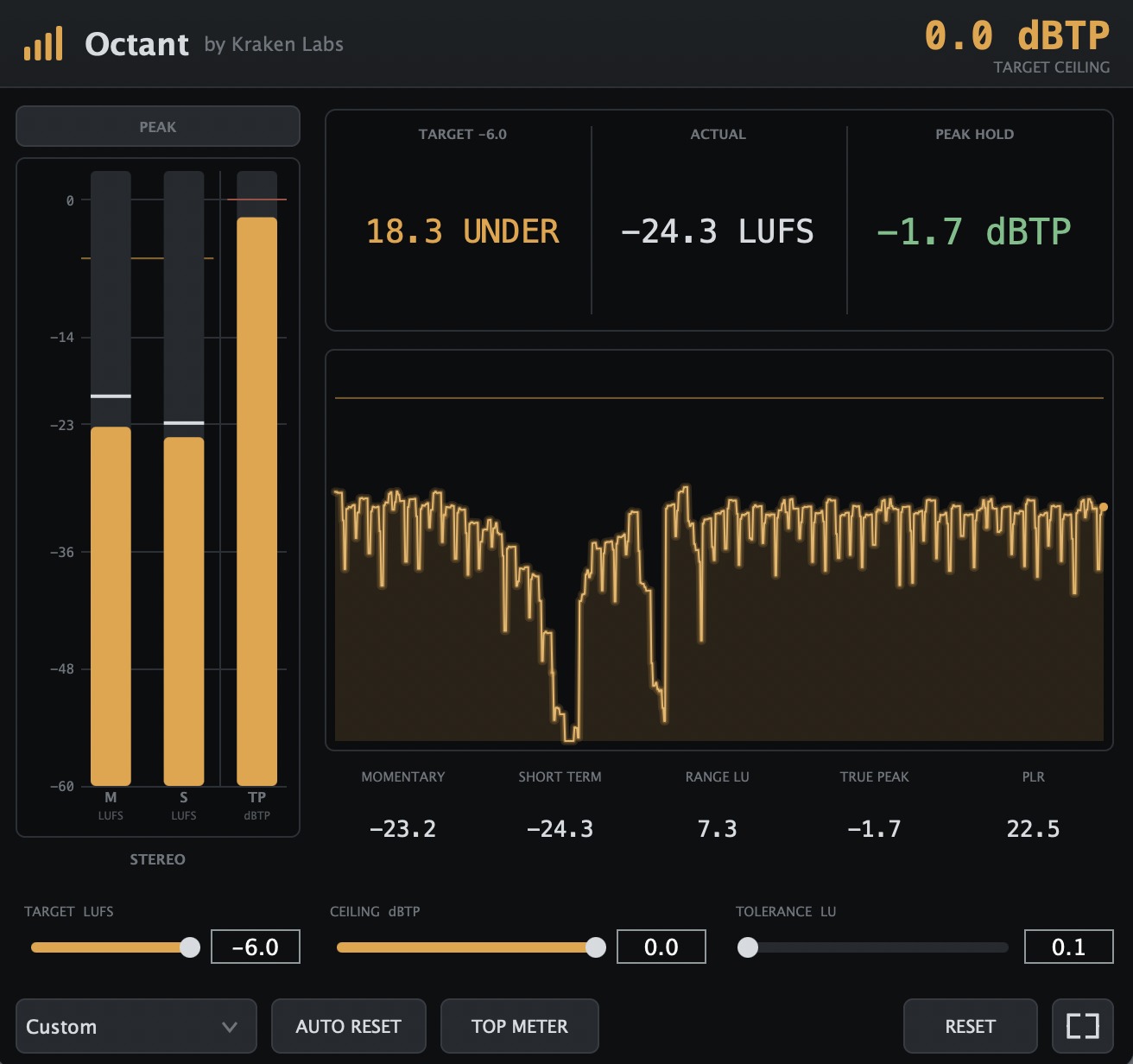
Octant is a free loudness and true peak meter for delivering audio to spec. Set your target and Octant tells you if you are clear, at a glance, from across the room. You pick a delivery target, and instead of a wall of numbers you get a plain verdict: how far under or over you are, your integrated loudness, and a peak hold that flags OVER the moment a true peak crosses the ceiling. Everything unlocked. No account, no nag.
Delivery targets
Set your target. Get a verdict, not a number.
Every platform wants a different loudness and a different true peak ceiling. Octant carries the presets, so you pick where the audio is going and it does the reading for you: Spotify at -14, Apple Music at -16, EBU R128 at -23, ATSC A/85 at -24, plus YouTube, Amazon, Netflix, and Podcast. The verdict then tells you how far under or over you are, in one glance. Octant opens on Custom, a plain 0 dBFS reference at a 0 dBTP ceiling that you dial in with three sliders: target LUFS, ceiling dBTP, and tolerance.
- Spotify
- Apple Music
- YouTube
- Amazon
- Netflix
- EBU R128
- ATSC A/85
- Podcast
- Custom
Features
- Delivery target presetsSpotify, Apple Music, YouTube, Amazon, Netflix, EBU R128, ATSC A/85, and Podcast, each with its own LUFS target and true peak ceiling. Plus Custom, the default, a 0 dBTP reference you set with three sliders for target LUFS, ceiling, and tolerance.
- A three-part verdictHow far under or over the target you are, your actual integrated loudness, and a PEAK HOLD that keeps the highest true peak and flags OVER once it crosses the ceiling.
- Full loudness meteringMomentary, short term, and integrated LUFS, loudness range (LRA), true peak (dBTP), and PLR, to ITU-R BS.1770-4 and EBU R128.
- Bar meter & history graphAn on-screen bar meter for momentary, short term, and true peak, with peak-hold marks and the target band, in a vertical or horizontal (TOP METER) layout, alongside a scrolling loudness history graph of the whole pass.
- Clip indicator & resetA latching clip indicator you click to clear. Turn on AUTO RESET to clear the meters on playback from the top, or free-run and clear them yourself with RESET.
- Second-screen displayA detachable, always-on-top meter window that shows everything the plugin window does, big enough to read from across the room. A STEREO / MONO readout tells you what is actually feeding the meter.
Pricing
Free. Everything unlocked.
Octant is free. There is no purchase, no subscription, no license key, and no account to create. Download it, drop it on your master bus, and every target, meter, and display is unlocked from the first launch.
Install
Install
- Open the downloaded
.dmgand double-click the installer. - Follow the prompts to complete the installation.
- It installs the VST3 and AU into your system plugin folders.
- Open your DAW and rescan plugins if needed. Load Octant on your master bus.
Requirements
- OS macOS 11 (Big Sur) or later
- Chips Apple Silicon & Intel (universal)
- Formats VST3, Audio Unit (AU)
- Hosts Any VST3 or AU host (Ableton, Bitwig, FL Studio, Reason, Logic, Cubase, Studio One, Reaper, and more)
A Windows build is not available yet. Want it first? Email me and I'll let you know the moment it ships.
FAQ
How much does Octant cost?
Octant is free. There is no purchase, no subscription, no license key, and no account. Download it, install it, and everything is unlocked.
What does Octant measure?
Momentary, short term, and integrated loudness (LUFS), loudness range (LRA), true peak (dBTP), and peak to loudness ratio (PLR), all to the ITU-R BS.1770-4 and EBU R128 standards.
What is a delivery target?
A delivery target is the loudness and true peak spec you are mastering to. Octant ships with presets for Spotify (-14), Apple Music (-16), YouTube, Amazon, EBU R128 (-23), ATSC A/85 (-24), podcast, and Netflix (approximate). It opens on Custom, a plain 0 dBFS reference at a 0 dBTP ceiling you dial in with three sliders for target LUFS, ceiling, and tolerance. Octant reads against the target you pick so you know at a glance whether your mix is clear.
How does the verdict work?
The verdict has three parts: how far under or over the target you are, your actual integrated loudness, and a PEAK HOLD that keeps the highest true peak of the pass and flags OVER the moment it crosses the ceiling. So you can see both whether the loudness lands on target and whether a single peak clipped, without reading a wall of numbers.
What is the clip indicator, and what does RESET do?
The clip indicator latches the moment a true peak crosses your ceiling and holds until you click it to clear, so you catch the single clip buried in a long pass instead of missing it while you looked away. Turn on AUTO RESET to clear the meters automatically when playback starts from the top, or free-run and clear them yourself with RESET.
Can I read it from across the room?
Yes. Octant has a detachable, always-on-top second-screen window that shows everything the plugin window does, big enough to read from the far side of a studio. A STEREO / MONO readout tells you what is actually feeding the meter.
Which DAWs does Octant work in?
Any VST3 or AU host: Ableton Live, Bitwig Studio, FL Studio, Reason, Logic Pro, Cubase, Studio One, Reaper, and more. Load it on your master bus.
Windows or macOS?
macOS 11 (Big Sur) or later, on both Apple Silicon and Intel (a single universal build). A Windows build is not available yet.
Ready to hit spec?
macOS (Apple Silicon & Intel).